
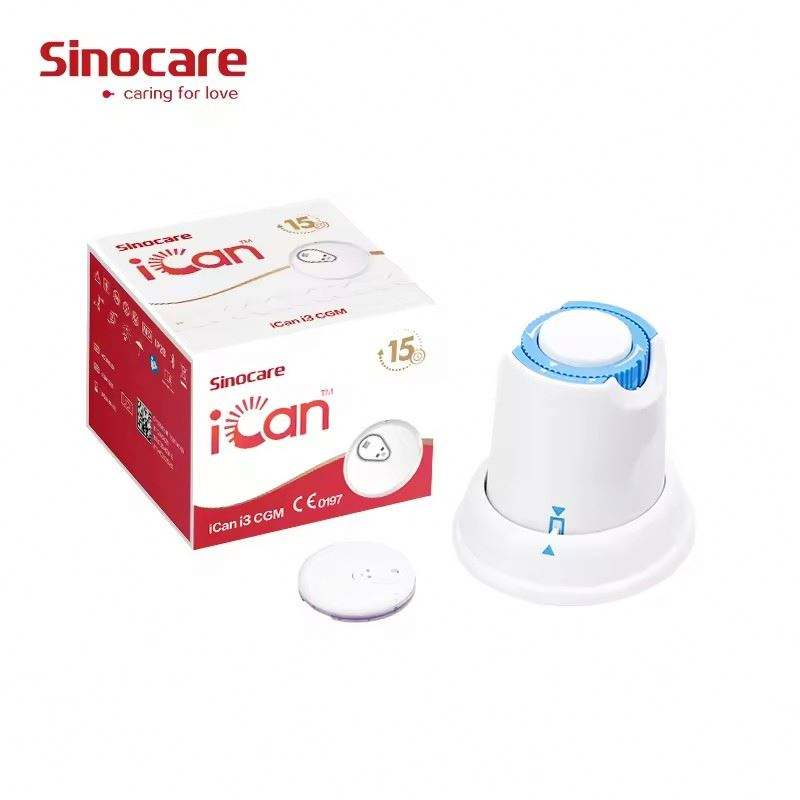
When shopping for a continuous glucose monitoring system, similar product photos can represent different packages. One listing may be a starter kit with the components needed for first-time setup, while another may contain only a replacement sensor, applicator, transmitter or reinforcement patch. This CGM starter kit vs replacement sensor checklist explains what to confirm before ordering.
This article provides product and compatibility information only. It does not diagnose a condition, recommend treatment or replace the instructions supplied with a glucose monitoring system.
CGM Starter Kit vs Replacement Sensor: The Main Difference
A starter kit generally contains the components required to begin using a particular CGM system. A replacement package may contain only a consumable component used after the original system has been activated. Manufacturers use different designs, so the words “starter kit” and “sensor” do not guarantee identical contents.
Always use the written package list, exact model number and current manufacturer documentation. A smartphone, receiver or applicator shown in a promotional image is not automatically included.
Components to Check in a CGM Listing
| Component | What to verify |
|---|---|
| Sensor or probe | Quantity, model generation, intended wear period and storage requirements |
| Applicator | Whether one is supplied for every sensor and whether it is single-use |
| Transmitter or emitter | Included, integrated, reusable or sold separately |
| Receiver | Included, optional or replaced by a compatible smartphone app |
| Smartphone app | Supported phones, operating systems, app-store regions and account requirements |
| Adhesive patch | Quantity, placement instructions and compatibility with the sensor housing |
| Manual | Language, activation steps, warnings, storage limits and replacement guidance |
How CGM System Designs Differ
Integrated transmitter designs
Some systems integrate communication hardware into each wearable sensor. Confirm whether the component is disposed of at the end of its stated use period.
Reusable transmitter or emitter designs
Other systems use a reusable transmitter or emitter with replaceable probes or sensors. A replacement listing may not include the reusable component. Confirm its service period, pairing requirements and exact compatible replacement reference.
App-only and receiver-compatible designs
Some systems display information mainly through a smartphone app; others may support a dedicated receiver. Check app availability and supported phones. Bluetooth support alone does not establish compatibility.
Six Checks Before Ordering
- Match the complete model name. Similar names can represent different generations.
- Read the written package contents. Do not rely only on the main image.
- Confirm app availability. Check the official app store and supported phone.
- Identify reusable and disposable parts. Determine what must be retained and replaced.
- Review storage and shipping limits. Sensors may have temperature, humidity and expiration requirements.
- Check support and return conditions. Opened or activated components may have restrictions.
Examples of Package Questions
For the Sinocare iCan i3 CGM, verify the sensor and applicator configuration and whether the official app supports your phone and region.
For the Ottai continuous glucose monitoring system, confirm included components, app requirements and activation instructions.
The SIBIONICS Light Edition CGM package shows a reusable-emitter format and reinforcement patch. Confirm whether the emitter, probe, applicator and patch are all included.
Do Not Assume Cross-Compatibility
Sensors, probes, transmitters, applicators and apps that look similar are not automatically interchangeable. Physical fit does not confirm software, electrical or model compatibility. Use only combinations permitted for the exact model and generation.
Safety and Use Considerations
Follow supplied instructions for skin preparation, application, activation, alerts, storage, travel and disposal. If a reading appears unexpected or does not match how you feel, follow the manufacturer confirmation procedure and contact a qualified healthcare professional when appropriate.
Frequently Asked Questions
Does a starter kit include a smartphone?
No. A phone in the images usually demonstrates the app. It is included only when the written package list says so.
Is an applicator included with every sensor?
Not necessarily. Confirm the number of sensors and applicators in the written contents.
Can I use a sensor from another generation?
Do not assume compatibility. Match the exact model, transmitter or emitter and app requirements.
Is the transmitter reusable?
This depends on system design. Some sensors integrate it; others use a separate reusable component.
What if the app is unavailable in my country?
Do not order until you confirm a supported display method. Availability and registration vary by region.
Can product information replace the manual?
No. Manufacturer instructions, compatibility documentation and qualified guidance take priority.
Final Buying Checklist
- Exact CGM model and generation confirmed
- Starter kit or replacement package identified
- Sensor, applicator and transmitter contents verified
- Phone, app and destination region checked
- Wear period and storage limits reviewed
- Reusable parts and replacement costs understood
Browse glucose monitoring products, read the CGM sensor and transmitter compatibility checklist, and compare CGM receiver and smartphone app options.
Target keyword: CGM starter kit vs replacement sensor
Suggested image alt text: CGM starter kit versus replacement sensor package checklist.